
Restaurant Guide
How to Get More Orders on Owner.com
Grow direct orders on Owner.com with 10 proven strategies. Optimize your branded website, mobile app, loyalty program, and professional menu photography.
How to get more orders on Owner.com
- Owner.com replaces 15-30% third-party commissions with a flat $499/month subscription plus 5% per order, giving restaurants dramatically better unit economics on every direct order.
- Your Owner.com website is your primary customer acquisition channel -- optimize it for local Google search with descriptive menu items, complete business information, and high-quality photos to drive organic traffic.
- The branded mobile app is the highest-retention channel on the platform, with app customers reordering at 2x the rate of web-only customers. Driving app downloads should be a top priority.
- Activate all marketing automations immediately -- abandoned cart recovery, win-back campaigns, birthday promotions, and review requests generate significant revenue with minimal ongoing effort.
- Professional photos on every menu item are the single highest-ROI visual investment, with items featuring images generating 30%+ more orders than text-only listings.
See the difference professional photos make
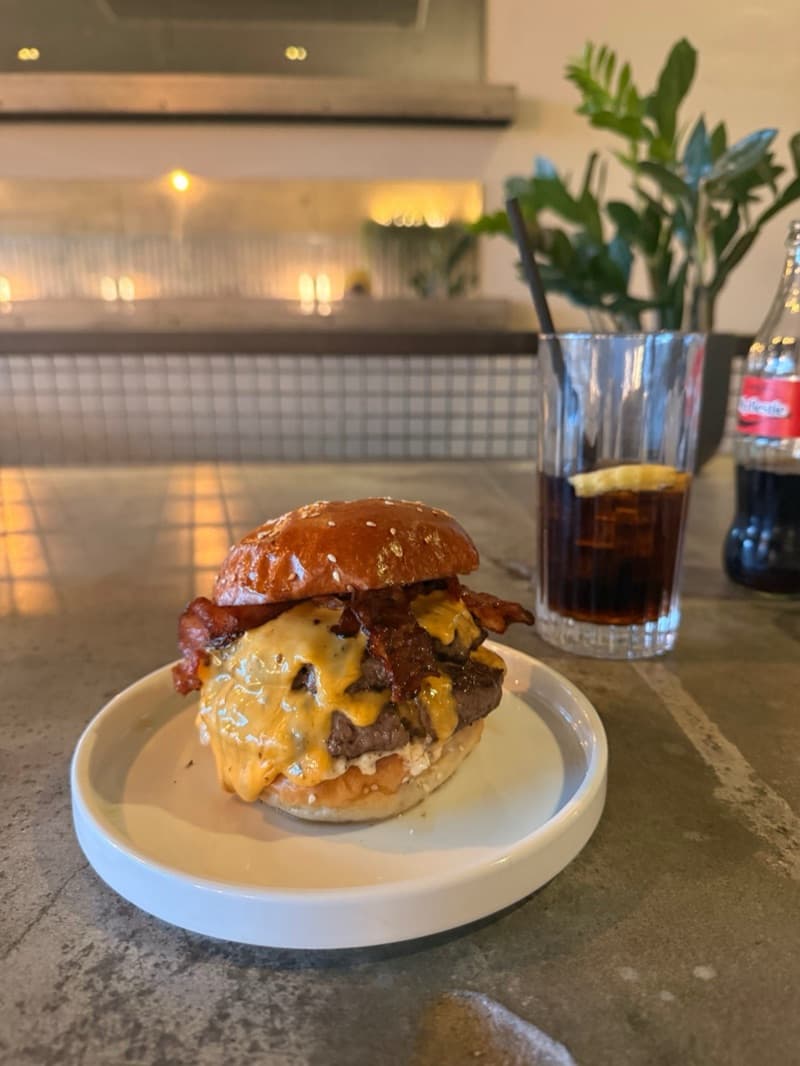
Before
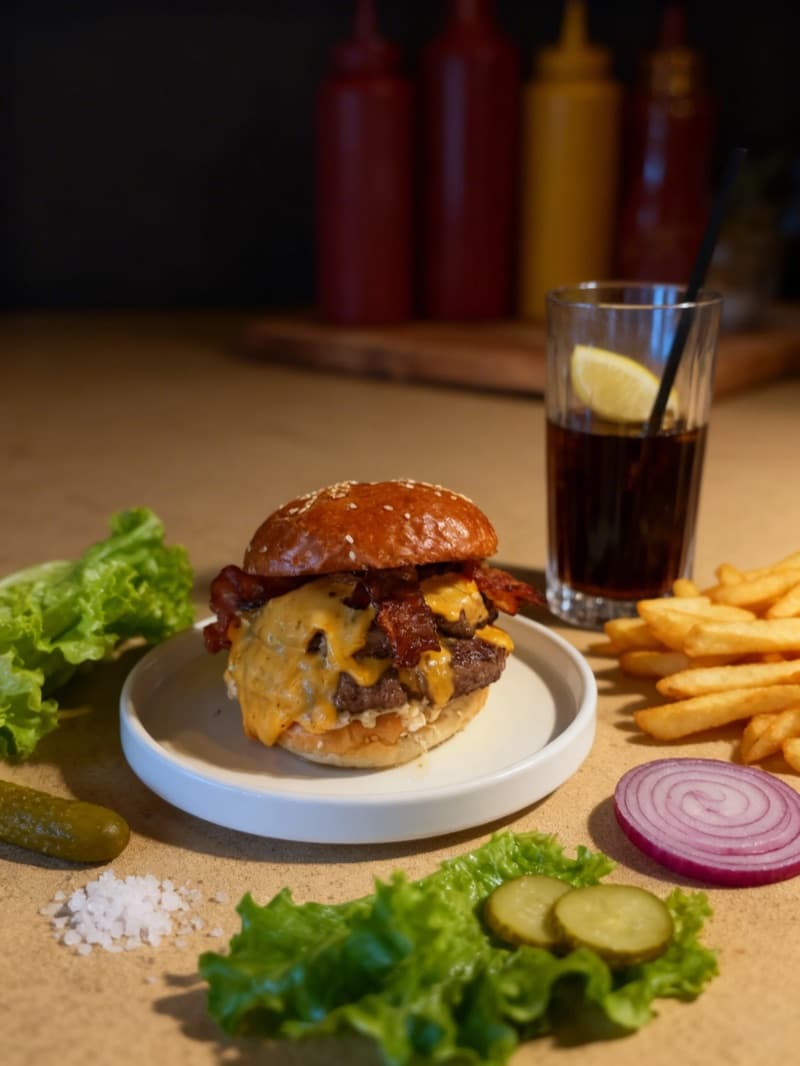
After
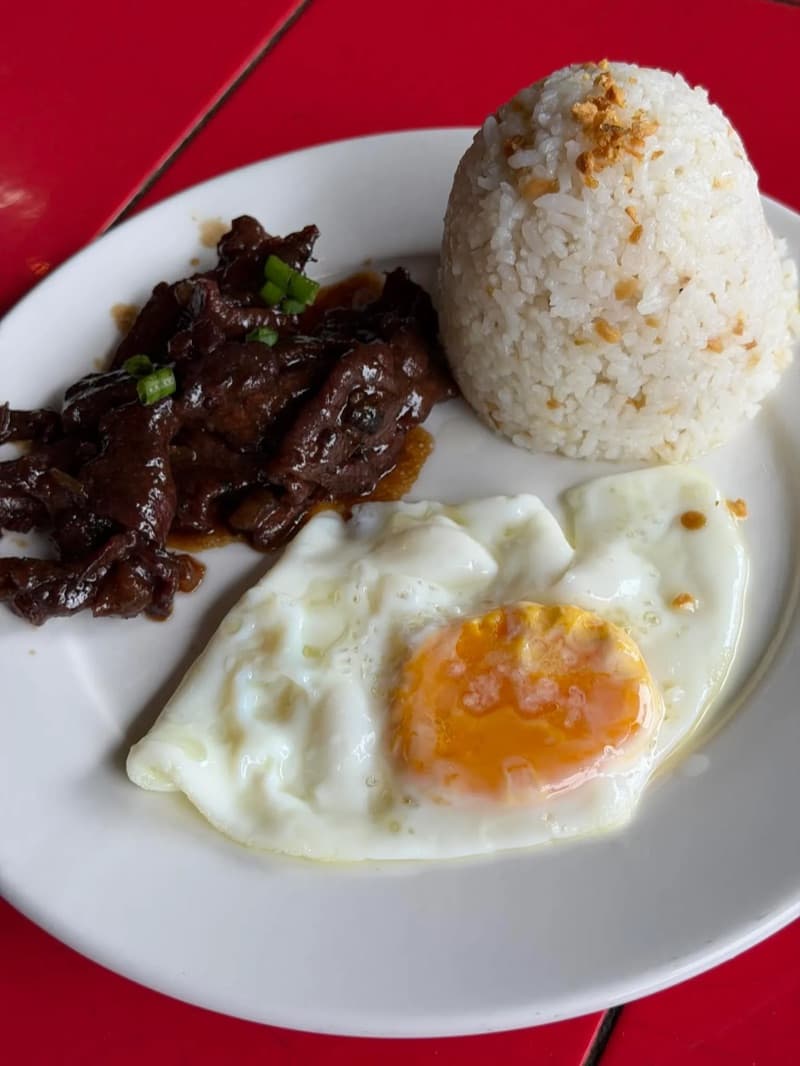
Before
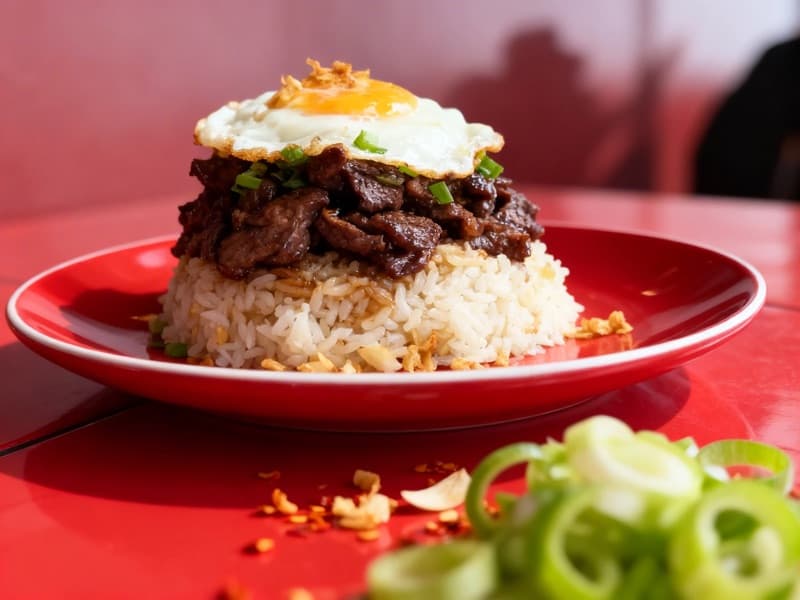
After
| Market share | 10,000+ independent restaurants served in the US |
|---|---|
| Customers | Millions of consumer orders processed annually |
| Partners | 10,000+ |
| Commission | $499/mo subscription + 5% per order (commission-free model) |
| Average order | $35-45 USD (direct orders average 35% higher than third-party) |
| Menu photo | 1200 x 800 pixels recommended minimum; 16:9 for hero banners, 1:1 or 4:3 for menu items |
Why Owner.com Matters for Your Restaurant
Owner.com is the fastest-growing direct ordering platform for independent restaurants in the United States, serving over 10,000 restaurant locations nationwide and valued at $1 billion following a $120 million Series C in May 2025. Unlike third-party delivery marketplaces such as DoorDash and Uber Eats that charge 15-30% commissions per order and control the customer relationship, Owner.com operates on a subscription model -- restaurants pay $499 per month plus a flat 5% per-order fee and keep ownership of every customer, every data point, and every repeat visit.
The platform provides a complete digital infrastructure stack: an AI-powered website builder optimized for Google search, a custom branded mobile app for iOS and Android with built-in loyalty rewards and push notifications, automated email and SMS marketing campaigns, abandoned cart recovery, and integrated delivery logistics. The result is a system that mirrors the digital sophistication of national chain brands but is accessible to single-location restaurants.
Owner.com was founded by Adam Guild and Dean Bloembergen, who pivoted the company during the COVID-19 pandemic from in-store traffic tools to commission-free online ordering. The platform has since processed hundreds of millions of dollars in orders for its restaurant partners and earned the #1 rating on both G2 and Capterra for restaurant technology software.
This guide breaks down exactly how Owner.com helps restaurants attract and retain customers, the specific tools the platform provides to drive direct orders, and the tactical steps restaurants are using in 2026 to grow revenue without bleeding margin to third-party commissions. Every recommendation is grounded in platform-specific features and real restaurant outcomes rather than generic advice that applies to any ordering system.
How Owner.com's Algorithm Ranks Restaurants
Owner.com does not operate like a third-party marketplace where an algorithm decides which restaurants appear in a consumer feed. There is no centralized app where your restaurant competes with thousands of others for visibility. Instead, Owner.com gives you your own branded digital ecosystem -- your website, your app, your customer list -- and the platform's discovery engine works to drive traffic directly to your storefront through search engines, social media, and automated remarketing.
The "algorithm" that matters on Owner.com is actually a combination of external discoverability signals and internal conversion optimization systems. On the external side, Owner.com builds your website with SEO best practices baked in, ensuring your restaurant ranks for local search terms on Google like "pizza delivery near me" or "best tacos in [your city]." On the internal side, the platform uses behavioral data to trigger automated marketing campaigns -- abandoned cart emails, win-back SMS messages, loyalty reward notifications, and push alerts -- that bring previous customers back for repeat orders.
Understanding these mechanics is critical because Owner.com shifts the growth model from competing for algorithmic placement on someone else's platform to building your own demand engine. The restaurants that succeed on Owner.com are those that actively optimize their website for search visibility, use the marketing automation tools to nurture their customer list, and invest in the visual presentation of their menu to maximize conversion rates on their own storefront.
| Factor | Weight | Details |
|---|---|---|
| Google Search Ranking (Local SEO) | high | Owner.com builds your restaurant website with SEO fundamentals including proper schema markup, fast page load speeds, mobile-first design, and location-optimized content. Your Google ranking for local search terms like "Thai food delivery in [city]" is the primary way new customers discover your direct ordering site. Restaurants that complete their website profile, add menu descriptions with relevant keywords, and maintain an active Google Business Profile with a linked ordering URL see dramatically more organic traffic than those who set up a basic page and forget about it. |
| Automated Marketing Engagement | high | Owner.com includes pre-built automated marketing campaigns that trigger based on customer behavior. Abandoned cart recovery emails, first-order follow-ups, birthday promotions, win-back campaigns for lapsed customers, and holiday promotions all run automatically once configured. The effectiveness of these campaigns determines your repeat order rate, which is the single most important revenue driver on a direct ordering platform. Restaurants that enable all available automations and maintain a growing email and SMS subscriber list generate significantly more repeat revenue than those relying solely on organic traffic. |
| Branded App Downloads and Push Notifications | high | Owner.com provides every restaurant with a custom-branded mobile app on iOS and Android. App customers reorder at twice the rate of web-only customers. Push notifications sent through the app have dramatically higher open rates than email, making the app the most powerful retention channel on the platform. The more app downloads you drive, the larger your captive audience for push-based promotions, loyalty rewards, and new menu item announcements. |
| Menu Presentation and Photo Quality | medium | Your Owner.com website and app serve as your digital storefront, and the menu is the conversion point where browsers become buyers. Items with professional, appetizing photos convert at significantly higher rates than items without images. Owner.com allows you to upload photos for every menu item, and the platform displays them prominently in the ordering flow. High-quality imagery combined with detailed descriptions and strategic pricing directly impacts your average order value and overall conversion rate. |
| Loyalty Program Participation | medium | Owner.com includes a points-based loyalty program integrated across both the website and mobile app. Customers earn points on every order and redeem them for rewards you define. The loyalty program creates switching costs that keep customers ordering directly from you rather than reverting to third-party apps. Restaurants with active loyalty programs and meaningful reward tiers see higher customer lifetime values and lower churn rates compared to those without a configured rewards structure. |
| Google Business Profile Optimization | medium | Your Google Business Profile is the gateway between Google Search, Google Maps, and your Owner.com ordering site. Adding your direct ordering URL to your Google Business Profile allows customers to order from you without ever visiting a third-party marketplace. Restaurants that maintain updated hours, respond to Google reviews, post regular updates, and link their Owner.com ordering URL see higher click-through rates from Google search results to their direct ordering page. |
| Customer Review Velocity | low | Owner.com includes automated review request campaigns that prompt customers to leave Google reviews after a positive ordering experience. A steady stream of recent positive Google reviews improves your local search ranking and builds trust with potential new customers who discover your restaurant through search. The review velocity -- how frequently new reviews are posted -- matters more to Google rankings than the total number of reviews alone. |
The fundamental difference between Owner.com and third-party delivery platforms is who controls the customer relationship. On DoorDash or Uber Eats, the platform owns the customer data -- you do not know who ordered from you, you cannot email them, and you cannot send them a push notification about a new menu item. On Owner.com, every customer who places an order becomes part of your CRM. You own their name, email, phone number, order history, and preferences. This data is the foundation of every growth strategy on the platform.
Owner.com's suggestion engine also uses behavioral data to increase average order values. The system recommends add-ons based on what other customers have ordered with similar items, dynamically adjusting suggestions based on purchase patterns. Owner.com reports that their checkout flow is optimized to be 24% faster than previous versions, reducing cart abandonment and improving conversion rates.
The platform also integrates with major POS systems including Square, Clover, Toast, Lightspeed, and Epos Now through direct integrations and via Otter. This means orders placed through your Owner.com website or app flow directly into your existing kitchen workflow without requiring a separate tablet or manual order entry. POS integration reduces errors, speeds up fulfillment, and creates a seamless operational experience that supports consistent order quality -- which in turn drives positive reviews and repeat business.
10 Proven Ways to Increase Your Owner.com Orders
1.Optimize Your Owner.com Website for Local Google Search
Your Owner.com website is your primary customer acquisition channel, and its visibility in Google search results determines how many new customers discover your restaurant without you paying for ads. Owner.com builds your site with SEO fundamentals including mobile-responsive design, fast loading speeds, and structured data markup, but you need to actively optimize the content to rank for the search terms your local customers are using.
Start by completing every section of your Owner.com website profile. Add your full business name, address, phone number, hours of operation, and a detailed description of your restaurant that includes your cuisine type, neighborhood, and city name. Search engines use this information to match your site with local queries like "Mexican restaurant delivery in South Beach" or "best sushi near downtown Austin." A sparse profile with missing details loses to competitors who have fully fleshed out their pages.
Write descriptive menu item names and descriptions that include natural language keywords. Instead of listing "Combo #3," name it "Grilled Chicken Burrito Combo with Rice, Beans, and a Drink." Customers search for specific dishes, and Google indexes your menu content. A menu full of numbered combos and abbreviations is invisible to search engines, while descriptive names generate organic traffic from customers searching for exactly what you serve.
Add high-quality photos to your website hero section, gallery, and every menu item. Google Image Search drives significant traffic to restaurant websites, and pages with original images rank higher than pages with stock photography or no images at all. Compress your images to keep page load times fast -- Owner.com's platform handles much of this automatically, but uploading unnecessarily large files can still slow your page speed score.
Link your Owner.com ordering URL to your Google Business Profile. When customers search for your restaurant name on Google, the Business Profile appears prominently with a direct link to order. This diverts traffic that would otherwise flow to third-party platforms like DoorDash or Uber Eats, which also bid on your restaurant name in search results. By having your direct ordering link front and center on Google, you capture that high-intent traffic commission-free.
Monitor your website traffic through Owner.com's built-in analytics dashboard. Track which search terms drive the most visitors, which pages have the highest bounce rates, and what percentage of visitors convert to orders. If your conversion rate is below 5%, the issue is likely your menu presentation -- missing photos, confusing category organization, or prices that are not competitive with what customers see on third-party apps. Fix the storefront before investing in additional traffic generation.
70%[5]
of consumers prefer ordering directly from a restaurant over third-party apps
2.Drive Branded App Downloads to Build a Captive Audience
Owner.com provides every restaurant with a custom-branded mobile app for iOS and Android, and this app is arguably the most powerful tool in your entire direct ordering toolkit. Customers who download your branded app reorder at twice the rate of web-only customers because the app sits on their home screen, sends push notifications, and integrates your loyalty rewards program into a seamless mobile experience.
The first step is making app downloads a priority across every customer touchpoint. Add a QR code linking to your app download on your physical receipts, table tents, takeout packaging, and front door signage. Include the download link in your email signature, your social media bio, and any printed marketing materials. Owner.com provides marketing templates for these materials, so you do not need to design them from scratch.
Incentivize the first app download with a meaningful offer. A "Download our app and get 15% off your first order" promotion costs you a one-time discount but creates a long-term retention channel. Once a customer has your app installed, you can reach them with push notifications at zero additional cost per message -- compare that to the ongoing expense of email marketing or the 15-30% commission on third-party platforms every single time that customer orders.
Push notifications are the primary engagement mechanism for app users. Use them strategically rather than spamming. Effective push notification strategies include announcing new menu items, sending limited-time offers during slow periods, reminding customers about expiring loyalty rewards, and promoting holiday or seasonal specials. Owner.com allows you to schedule push notifications in advance and segment your audience based on order history and preferences.
Track your app download numbers and app-to-order conversion rate in the Owner.com dashboard. Set a monthly app download target and measure progress. A restaurant with 2,000 app users who each order twice per month at $40 per order generates $160,000 in monthly direct revenue -- commission-free except for the flat 5% platform fee. Compare that to the same order volume on a third-party platform at 25% commission, where you would lose $40,000 per month in fees.
The compounding effect of app users is what makes this strategy transformative over time. Every new app download expands your addressable push notification audience, which increases repeat order frequency, which grows revenue without proportionally increasing marketing spend. Restaurants that achieve 5,000 or more app downloads create a self-sustaining direct ordering channel that makes third-party marketplace dependency obsolete.
2x[3]
App customers reorder at twice the rate of web-only customers
3.Activate Every Automated Marketing Campaign on Day One
Owner.com includes a suite of pre-built automated marketing campaigns that function as a virtual marketing team working around the clock. These campaigns trigger based on customer behavior and require minimal ongoing management once configured. The restaurants that generate the most repeat revenue on Owner.com are those that enable all available automations immediately rather than treating them as optional features to explore later.
The abandoned cart recovery campaign is the single highest-ROI automation. When a customer adds items to their cart but does not complete the order, Owner.com automatically sends an email and optionally an SMS reminder prompting them to return and finish their purchase. Cart abandonment rates for online food ordering typically range from 60-80%, meaning the majority of customers who begin an order never complete it. Recovering even a fraction of those abandoned carts translates directly into captured revenue that would otherwise be lost.
The win-back campaign targets customers who have not ordered within a defined period -- typically 30, 60, or 90 days. These lapsed customers already know your restaurant and have demonstrated purchase intent, making them far cheaper to reactivate than acquiring a brand-new customer. The automated win-back email includes a personalized offer (such as 15% off their next order) and a direct link to your ordering page. This campaign runs continuously in the background, automatically identifying and re-engaging customers who are drifting away.
Birthday and anniversary campaigns create personalized touchpoints that strengthen the customer relationship. When a customer provides their birthdate during signup or checkout, Owner.com automatically sends a birthday offer -- a free dessert, a percentage discount, or bonus loyalty points. These campaigns feel personal and generate outsized goodwill relative to their cost, often producing social media shares and word-of-mouth referrals.
First-order follow-up emails thank new customers and encourage a second purchase. The transition from one-time buyer to repeat customer is the most critical conversion point in any direct ordering business. A well-timed follow-up email with a small incentive for the second order dramatically increases the probability of forming a repeat ordering habit.
Owner.com also provides holiday and seasonal campaign templates that go out automatically for major occasions -- Super Bowl Sunday, Valentine's Day, Thanksgiving, and more. These pre-built templates reduce the marketing effort required from restaurant owners to zero while ensuring your restaurant stays top-of-mind during the highest-volume ordering periods of the year.
Review the performance of all your automations in the Owner.com marketing dashboard. Track open rates, click-through rates, and attributed revenue for each campaign. If a campaign is underperforming, adjust the offer amount, subject line, or timing rather than disabling it entirely.
270%[4]
Average increase in online orders within the first 90 days on Owner.com
4.Structure Your Loyalty Program to Maximize Repeat Orders
Owner.com includes a built-in points-based loyalty program that operates across both your website and branded mobile app. The loyalty program is one of the most effective tools for building customer retention because it creates a tangible incentive for customers to order directly from you rather than reverting to third-party delivery apps where they earn no rewards. Structuring your rewards tiers strategically is the difference between a loyalty program that drives behavior and one that customers ignore.
Set your points-per-dollar ratio so that customers earn a meaningful reward within 3-5 orders. If the first reward requires 15 orders, most customers will never reach it and the program loses its motivational power. A common effective structure is 1 point per dollar spent, with the first reward (such as a free side or drink) available at 50 points. For a restaurant with a $35 average order value, this means customers earn their first reward after approximately 2 orders, which reinforces the habit loop early and motivates a third order to start earning toward the next tier.
Create multiple reward tiers with escalating value. A simple structure might be: 50 points for a free side dish, 100 points for a free entree, and 200 points for 25% off an entire order. The escalating value keeps engaged customers motivated to continue ordering rather than cashing out their points at the lowest tier and disengaging. The most loyal customers -- those who reach the highest tiers -- are also your most profitable because their acquisition cost is zero and they order with the highest frequency.
Promote your loyalty program on every customer touchpoint. Mention the rewards balance on order confirmation emails, display progress toward the next reward on the app home screen, and train your in-store staff to mention the program during pickup orders. Owner.com handles the tracking and display automatically, but the promotional messaging is what drives awareness and enrollment.
Use loyalty point bonuses to incentivize specific behaviors. Offer double points on orders placed during your slowest days, triple points for trying a new menu item, or bonus points for referring a friend. These targeted bonuses let you use the loyalty program as a flexible marketing tool that addresses specific business challenges -- filling slow dayparts, launching new items, and acquiring new customers through referrals.
Track your loyalty program metrics in the Owner.com dashboard: enrollment rate, active member percentage, redemption rate, and the revenue difference between loyalty members and non-members. Most restaurants find that loyalty members spend 20-30% more per year than non-members and order 2-3 times more frequently, making the loyalty program one of the highest-ROI features on the entire platform.
5.Add Professional Photos to Every Menu Item on Your Storefront
On Owner.com, your website and app are your storefront. There is no browse feed of competing restaurants where customers compare options -- once a customer lands on your page, the only decision is whether to order from you or leave. The visual presentation of your menu is the single most important factor in that conversion decision, and items with professional photos dramatically outperform items without images.
Industry research consistently shows that menu items with professional photographs generate 25-35% more orders than text-only listings. On a direct ordering platform like Owner.com, this conversion impact is even more pronounced because every lost conversion represents a customer who may return to a third-party app where your competitors have invested in photography. Your Owner.com menu needs to be visually competitive with or superior to your listings on DoorDash and Uber Eats.
Start with your hero image -- the large banner photo that appears at the top of your website and app. This image is the first thing every visitor sees and it sets the tone for the entire ordering experience. Use a high-resolution photograph of your signature dish or a carefully styled spread of your most popular items. The hero image should communicate your cuisine style, quality level, and brand personality in a single glance.
For individual menu items, photograph each dish on a clean, uncluttered background with consistent lighting. Natural daylight or a simple two-light softbox setup produces the best results. Shoot from a 45-degree angle for most dishes, switching to a direct overhead angle for flat items like pizzas, salads, and platters. Ensure the food fills at least 60-70% of the frame and that garnishes and plating look intentional rather than messy.
Upload photos at a minimum of 1200 pixels wide to ensure they display sharply on high-resolution phone screens. Owner.com's platform will resize images for optimal loading speed, but starting with a high-resolution source image prevents pixelation and blurriness that undermine the professional appearance you are aiming for. Use JPEG format for photos to balance quality with file size, keeping individual files under 2MB for fast page loads.
Achieving 100% photo coverage across your entire menu is the goal. Even a few items without photos create visual inconsistency that signals a lack of attention to detail. Customers browsing your menu interpret missing photos as uncertainty about what the dish looks like, which increases the likelihood of cart abandonment. If you cannot photograph every item immediately, prioritize your top 20 sellers first, then systematically fill in the gaps.
AI photo enhancement tools like MenuPhotoAI can transform basic smartphone food photos into professional-grade images suitable for your Owner.com storefront. This approach delivers the visual quality of a professional shoot at a fraction of the cost and turnaround time, making 100% photo coverage achievable even for restaurants with large menus.
30%+[6]
More orders for menu items with professional photos vs. items without
6.Connect Your Google Business Profile to Capture High-Intent Traffic
Your Google Business Profile is the bridge between the millions of people searching for restaurants on Google every day and your Owner.com direct ordering page. When someone searches "pizza delivery near me" or your restaurant name, your Google Business Profile appears prominently with your hours, reviews, photos, and -- critically -- an "Order Online" link. Ensuring that link points to your Owner.com page rather than a third-party marketplace is one of the most impactful things you can do to shift order volume to your direct channel.
Log into your Google Business Profile and add your Owner.com ordering URL as your primary ordering link. Google allows restaurants to specify a preferred ordering provider, and you should claim this spot for your own website rather than letting DoorDash, Uber Eats, or Grubhub auto-populate the link. Third-party platforms often add themselves to your Google Business Profile without your permission, so regularly audit your profile to ensure your direct ordering link is the one customers see first.
Optimize your Google Business Profile with complete and accurate information. Your business name, address, phone number, hours of operation, and cuisine categories must be consistent with your Owner.com website. Inconsistencies between your Google profile and your website confuse search engines and can suppress your local search ranking. Add all relevant categories -- "Italian restaurant," "Pizza delivery," "Catering" -- to maximize the search queries your profile appears for.
Post regular updates to your Google Business Profile. Google rewards active profiles with higher visibility in local search results. Share updates about new menu items, seasonal specials, upcoming events, or behind-the-scenes photos of your kitchen. Each post gives Google a signal that your business is active and engaged, which improves your ranking for local queries.
Respond to every Google review, both positive and negative. Review response rate is a ranking signal for Google, and thoughtful responses demonstrate to potential customers that you value feedback. For negative reviews, acknowledge the concern, explain what you have done to address it, and invite the customer to order again. For positive reviews, thank the customer and subtly mention your direct ordering option or loyalty program.
Owner.com includes automated review request campaigns that prompt customers to leave a Google review after a positive ordering experience. Enable this automation to build a steady stream of recent reviews, which Google weighs more heavily than older reviews. A restaurant with 10 new 5-star reviews per month will rank higher in local search than one with 500 total reviews but no new activity.
Upload high-quality photos to your Google Business Profile regularly. Profiles with 100 or more photos receive significantly more clicks than those with fewer than 10. Use your Owner.com menu photos, interior shots, exterior photos, and behind-the-scenes kitchen images. Google image search is a significant traffic source for restaurants, and the photos on your Business Profile feed directly into those search results.
7.Use SMS and Email Marketing to Fill Off-Peak Hours
Owner.com provides both email and SMS marketing capabilities, and used strategically, these channels can transform your slowest hours into reliable revenue generators. The key is targeting your outreach for periods when your kitchen has spare capacity and customer demand is naturally low, rather than blasting promotions during your Friday dinner rush when you would have received those orders at full price anyway.
Identify your off-peak hours using the analytics in your Owner.com dashboard. For most restaurants, the slowest periods are Tuesday and Wednesday lunches, weekday afternoons between 2-5 PM, and late evenings after 9 PM. These are the windows where a targeted promotion can generate truly incremental orders without cannibalizing full-price demand during peak hours.
SMS messages have dramatically higher engagement rates than email -- open rates above 90% compared to 20-25% for email. However, SMS is also more intrusive, so use it sparingly and with high-value offers. Reserve SMS for your most compelling promotions: flash sales, limited-time menu items, and loyalty reward expiration reminders. Send no more than 2-4 SMS messages per month to avoid fatigue and opt-outs.
Email works best for longer-form content and ongoing relationship building. Use email for weekly specials announcements, new menu item introductions, loyalty program updates, and seasonal promotions. Owner.com's pre-built email templates make it easy to create professional-looking emails without design skills. Segment your email list based on order history -- send different offers to frequent customers versus lapsed ones, and personalize subject lines with the customer's name and favorite menu items.
Build your subscriber list actively at every customer touchpoint. Ask for email addresses and phone numbers during the checkout process on your Owner.com site. Include a sign-up incentive (such as 10% off the next order) to motivate opt-ins. Add a sign-up link to your social media profiles and in-store signage. The larger your subscriber list, the more revenue each campaign generates, making list building a compounding investment.
A/B test your subject lines, offer amounts, and send times to optimize performance over time. Owner.com's marketing analytics show which campaigns drive the most attributed revenue, allowing you to double down on what works and retire what does not. Most restaurants find that a combination of one weekly email and two monthly SMS messages strikes the right balance between staying top-of-mind and respecting customer preferences.
The compounding value of owned marketing channels is what makes Owner.com fundamentally different from third-party platforms. Every email subscriber and SMS opt-in you collect is a customer you can reach at any time, for any reason, at negligible cost per message. Compare this to paying 25-30% commission on every single order through a marketplace, and the long-term economics of building your own marketing list become overwhelmingly clear.
8.Optimize Your Menu and Checkout Flow for Maximum Conversion
Owner.com has invested heavily in checkout optimization, reporting that their latest checkout flow is 24% faster than previous versions. But the conversion funnel starts long before checkout -- it begins the moment a customer lands on your menu page. Optimizing the entire path from browsing to payment completion is essential for maximizing the revenue you capture from every visitor to your site.
Organize your menu into clear, logical categories with your most popular and profitable items at the top. Owner.com allows you to create custom categories and arrange them in any order. Place a "Most Popular" or "Fan Favorites" category first, featuring your top 5-8 sellers. Customers experiencing decision fatigue often default to whatever appears first, so positioning your best items prominently captures orders that might otherwise be lost to indecision and bounce.
Write menu item descriptions that sell, not just list ingredients. Instead of "Chicken sandwich with lettuce, tomato, and mayo," write "Crispy buttermilk fried chicken on a toasted brioche bun with fresh-cut lettuce, vine-ripened tomato, and house-made garlic aioli." Descriptive language triggers sensory responses that make customers hungry and more likely to add the item to their cart. Include allergen information and dietary labels (gluten-free, vegan, spicy) to remove hesitation for customers with restrictions.
Add modifiers and upsells to every applicable menu item. Owner.com's suggestion engine automatically recommends add-ons based on customer preferences and past orders, but you control which modifiers are available. Common high-impact modifiers include size upgrades, premium protein additions, extra sides, drink pairings, and dessert add-ons. Each modifier represents a micro-upsell opportunity that most customers engage with when presented naturally during the ordering flow.
Set your prices strategically relative to third-party platform listings. Many restaurants mark up prices on DoorDash and Uber Eats by 15-20% to offset commission costs, then match those inflated prices on their Owner.com site. This is a missed opportunity. Instead, price your Owner.com menu at your true prices -- equal to or lower than your in-store prices -- and communicate the savings explicitly: "Order direct and save vs. delivery apps." The price advantage becomes a powerful reason for customers to switch from third-party apps to your direct channel.
Minimize the number of steps between "Add to Cart" and "Place Order." Owner.com's checkout flow is already optimized for speed, but ensure your settings are configured to remove unnecessary friction. Enable guest checkout for first-time customers, offer multiple payment options including Apple Pay and Google Pay, and set default tip suggestions at reasonable amounts. Every additional form field or required account creation step increases the probability of cart abandonment.
Review your checkout analytics in the Owner.com dashboard to identify drop-off points. If customers are adding items but not completing orders, the issue is likely in the checkout flow -- payment friction, unexpected fees, or delivery time estimates that seem too long. Address these friction points systematically and monitor whether abandonment rates improve.
9.Use Owner.com Delivery Integration to Offer Full-Service Ordering
One of the most common objections restaurants have about leaving third-party platforms is losing access to a delivery driver network. Owner.com addresses this directly by providing integrated delivery logistics with a flat delivery fee charged to the customer and no commission charged to the restaurant. This means you can offer delivery through your own branded website and app without building or managing your own driver fleet.
Owner.com partners with delivery service providers to dispatch drivers for your orders, handling routing, tracking, and customer communication automatically. The customer sees a branded delivery experience -- your restaurant name, your tracking page, your communication -- rather than a generic third-party experience. This maintains brand consistency and reinforces the direct relationship between your restaurant and your customers.
Set your delivery radius based on realistic fulfillment times rather than trying to cover the largest possible area. A tighter delivery radius with faster delivery times produces better customer satisfaction, fewer cold-food complaints, and higher reorder rates than a wide radius where delivery takes 45-60 minutes. Start with a 3-5 mile radius and expand only if your order volume and delivery partner capacity support it without degrading the customer experience.
Promote your delivery offering prominently on your Owner.com website and app. Many customers assume that direct ordering means pickup only, and they default to third-party apps when they want delivery. Use banner messaging like "Free delivery on orders over $25" or "Fast delivery, no app fees" to communicate that delivery is available and more affordable than marketplace alternatives. Owner.com lets you set minimum order amounts for delivery to ensure profitability on each delivered order.
Offer both delivery and pickup options and let the data show you which one your customers prefer. For many restaurants, pickup orders represent 40-60% of direct ordering volume and are significantly more profitable because there are no delivery costs. Encourage pickup with small incentives like "10% off pickup orders" or "Skip the wait -- your order is ready when you arrive." Customers who live nearby often prefer pickup when given a reason, and these orders are your highest-margin transactions.
Compare your delivery economics on Owner.com versus third-party platforms. On a $40 order through DoorDash at 25% commission, you net $30 before food cost. On a $40 order through Owner.com at 5% platform fee with the customer paying the delivery fee, you net $38. That $8 per-order difference on 500 monthly delivery orders is $4,000 in additional monthly profit -- enough to fund your entire Owner.com subscription several times over and invest the remainder in marketing to drive even more direct orders.
$8+[7]
Additional profit per order on Owner.com vs. typical third-party commission
10.Track Your Analytics Dashboard and Iterate Monthly
Owner.com provides a comprehensive analytics dashboard that gives you visibility into every aspect of your direct ordering business. The restaurants that grow fastest on the platform are those that review their data at least weekly and make adjustments based on what the numbers reveal rather than operating on gut instinct alone.
Start with your top-line metrics: total revenue, total orders, average order value, and new versus returning customer ratio. Track these numbers weekly and compare them to the previous week and the same week last month to identify trends. A declining returning customer ratio signals a retention problem that your loyalty program and marketing automations should address. A declining average order value suggests your menu modifiers and upsell strategy need refinement.
Drill into your marketing campaign performance to understand which channels drive the most revenue per dollar invested. Owner.com tracks attributed revenue for email campaigns, SMS campaigns, push notifications, and automated flows separately. If your abandoned cart recovery emails generate $3,000 per month in recovered revenue but your weekly promotional emails only generate $500, that tells you to invest more effort in optimizing the promotional emails rather than assuming email marketing does not work for your restaurant.
Monitor your customer acquisition sources to understand where new customers find you. Are they coming from Google search, social media, referrals, or direct traffic? If Google search drives the majority of new customers, doubling down on SEO optimization and Google Business Profile management will yield the highest return. If referrals are your top source, consider launching a formal referral program with incentives for both the referrer and the new customer.
Track your menu item performance at the individual item level. Owner.com shows you which items are ordered most frequently, which have the highest average order value when included in a cart, and which are most commonly abandoned. Use this data to refine your menu: promote high-performers, improve or remove low-performers, and experiment with new items positioned alongside your proven sellers.
Set monthly growth targets for the three metrics that matter most on Owner.com: total direct orders, app downloads, and email or SMS subscriber list size. These three metrics compound over time -- more app users means more push notification reach, which means more repeat orders, which means more revenue to reinvest in marketing and menu development. A restaurant that grows each metric by just 10% per month will double its direct ordering business in seven months.
Schedule a monthly "Owner.com optimization session" where you review all dashboard data, evaluate campaign performance, adjust your menu based on item analytics, refresh your promotional offers, and plan the next month's marketing calendar. Treat your direct ordering channel with the same operational rigor you apply to your in-store operations, and the revenue results will follow.
Better menu photos from your own phone photos
MenuPhotoAI turns a photo of your own dish into a professional menu image in minutes. You decide where to use it. Start with 5 free photos (watermarked), no credit card required.
Try MenuPhotoAI FreeOwner.com Photo Requirements
| Minimum resolution | 1200 x 800 pixels recommended minimum |
| Aspect ratio | 16:9 for hero banners, 1:1 or 4:3 for menu items |
| Max file size | 2MB per image recommended for optimal page load speed |
| Accepted formats | JPEG, PNG, WebP |
| Photos per item | 1 primary photo per menu item |
| Hero/cover image | 1920 x 1080 pixels recommended for website hero banner |
Owner.com automatically optimizes and resizes uploaded images for web and mobile display. Photos should feature a single dish with clean backgrounds and consistent natural or studio lighting. High-resolution source images are recommended since the platform handles compression. Menu photos display prominently in the ordering flow on both the website and branded mobile app.
On Owner.com, your menu photos are not competing for attention in a crowded marketplace feed alongside dozens of other restaurants. Instead, they are the sole visual experience a customer encounters on your branded website and app. This makes photo quality both more important and more impactful than on third-party platforms -- every visitor to your site is already interested in your restaurant specifically, and professional photos are what convert that interest into a placed order.
The visual hierarchy on your Owner.com storefront begins with the hero image, which occupies the full width of the screen on both desktop and mobile. This banner image is the first impression every visitor receives, and it should showcase either your signature dish or a curated spread that communicates your cuisine style and quality level. A dark, blurry, or generic hero image immediately signals a low-quality experience, regardless of how good your food actually is.
Individual menu item photos appear inline with the ordering flow, meaning customers see the image right next to the item name, description, and price as they browse your menu. Items without photos create visual gaps that interrupt the browsing experience and introduce uncertainty. A customer scanning your menu will unconsciously skip items without images and gravitate toward items they can see, which means unphoto'd items are effectively hidden even though they are listed on your page.
Consistency across your entire menu photo set matters as much as individual photo quality. If half your photos are shot in natural daylight on a marble surface and the other half are dark smartphone snaps on a cluttered kitchen counter, the inconsistency undermines the professional impression you are trying to create. Choose a single styling approach -- consistent background, lighting, and angle -- and apply it to every item.
For direct ordering platforms like Owner.com, food photography serves a different strategic purpose than on third-party apps. On DoorDash or Uber Eats, your photos compete for attention in a feed. On Owner.com, your photos close the sale. The customer has already chosen your restaurant -- your photos need to make them hungry enough to press "Add to Cart" rather than closing the tab. This means focusing on appetizing presentation: steam rising from hot dishes, sauce glistening, cheese pulling, and portions that look generous.
AI-powered photo enhancement tools like MenuPhotoAI are particularly valuable for Owner.com restaurants because they enable consistent, professional-quality imagery across your entire menu without the $300-500 cost of a professional photo shoot. Upload your smartphone photos and receive enhanced images that meet the visual standards your branded storefront demands, complete with clean backgrounds, balanced lighting, and appetizing color correction.
35%[6]
Higher spending per order on direct ordering platforms with professional photos
Owner.com Promotion Tools
Automated Email Campaigns
Included in $499/month subscription -- no additional per-email fees.Pre-built email marketing automations including abandoned cart recovery, win-back campaigns for lapsed customers, first-order follow-ups, birthday promotions, and holiday seasonal campaigns. All campaigns trigger automatically based on customer behavior and require minimal ongoing management.
SMS Marketing
Included in subscription with standard messaging volume; high-volume SMS may incur additional carrier fees.Text message marketing with 90%+ open rates for flash promotions, loyalty reward reminders, and limited-time offers. Supports audience segmentation based on order history and preferences. Higher engagement rates than email for time-sensitive promotions.
Push Notifications (Branded App)
Included in $499/month subscription -- no per-notification fees.Send push notifications directly to customers who have downloaded your branded mobile app. Zero cost per message after app download. Ideal for new menu announcements, flash deals, loyalty point reminders, and re-engagement campaigns.
Loyalty Rewards Program
Included in $499/month subscription. Reward costs are funded by the restaurant.Points-based loyalty program integrated across website and mobile app ordering. Customers earn points on every order and redeem for rewards you define. Customizable tiers, bonus point promotions, and referral incentives. Tracks redemption rates and loyalty member revenue attribution.
Abandoned Cart Recovery
Included in $499/month subscription.Automatically sends email and/or SMS reminders to customers who add items to their cart but do not complete the order. Recovers revenue from the 60-80% of online food orders that are abandoned before checkout. Includes customizable timing, messaging, and optional discount incentives.
Google Business Profile Ordering Link
Free -- requires manual setup in Google Business Profile settings.Direct integration of your Owner.com ordering URL into your Google Business Profile, allowing customers to order directly from Google Search and Google Maps results. Diverts traffic from third-party platform links that may appear on your profile.
AI-Powered Suggestion Engine
Included in $499/month subscription.Dynamic upsell recommendations that suggest add-ons, sides, and complementary items based on what other customers have ordered with similar dishes. Increases average order value automatically during the checkout flow without requiring manual configuration.
Automated Review Requests
Included in $499/month subscription.Automatically prompts customers to leave a Google review after a positive ordering experience. Builds a steady stream of recent reviews that improve local search ranking and social proof for new customers discovering your restaurant.
Common Mistakes to Avoid
Setting Up the Website and Never Optimizing It
Many restaurants launch their Owner.com website and treat it as a set-and-forget project. Without ongoing SEO optimization, menu updates, fresh photos, and content additions, your site stagnates in Google search rankings while competitors who actively maintain their pages climb higher. Schedule monthly website reviews to update descriptions, add seasonal items, refresh photos, and ensure all business information is current.
Ignoring the Marketing Automations
Owner.com includes powerful automated campaigns like abandoned cart recovery, win-back emails, and birthday promotions that generate significant revenue when enabled. Many restaurants never configure these campaigns or leave them in draft mode. Activate every available automation on day one -- they run in the background with minimal maintenance and recover revenue you would otherwise lose.
Not Promoting the Branded Mobile App
The branded app is one of Owner.com's most valuable features, with app users reordering at 2x the rate of web-only customers. Yet many restaurants never mention the app to their customers. Add QR codes to receipts, table tents, packaging, and in-store signage. Include the download link in email signatures and social media bios. Every app install creates a long-term retention channel.
Leaving Third-Party Links on Google Business Profile
DoorDash, Uber Eats, and Grubhub often auto-populate ordering links on your Google Business Profile without your permission. If a customer clicks a DoorDash link from your Google profile, you lose 25-30% in commission on that order. Regularly audit your Google Business Profile to ensure your Owner.com direct ordering link is the primary option and remove unauthorized third-party links.
Pricing Menu Items the Same as Third-Party Platforms
Many restaurants inflate prices on DoorDash and Uber Eats by 15-20% to offset commissions, then match those inflated prices on their Owner.com site. This eliminates one of your strongest selling points for direct ordering. Price your Owner.com menu at your true prices and explicitly communicate the savings: "Order direct and save up to 20% vs. delivery apps." The price advantage is a powerful conversion motivator.
Sending Too Many SMS Messages
SMS marketing has 90%+ open rates, which makes it tempting to send frequent messages. But customers have a low tolerance for text message marketing. Sending more than 2-4 SMS per month leads to high opt-out rates, destroying your most effective communication channel. Reserve SMS for your highest-value offers and use email for regular promotions.
Not Tracking Analytics or Setting Growth Targets
Owner.com provides detailed analytics on revenue, orders, customer acquisition sources, campaign performance, and menu item conversion. Restaurants that ignore these metrics miss opportunities to optimize underperforming areas. Review your dashboard weekly and set monthly targets for total orders, app downloads, and subscriber list growth.
Running Promotions During Peak Hours Instead of Off-Peak
Offering discounts during your Friday dinner rush discounts orders you would have received at full price. Target promotions for genuinely slow periods like Tuesday lunch, weekday afternoons, or late evenings where incremental orders represent true revenue growth. Use your Owner.com analytics to identify actual off-peak windows before scheduling promotions.
Your Action Checklist
Website & SEO Setup
- Complete all website profile fields including business name, address, phone, hours, and cuisine description
- Write descriptive menu item names with cuisine-specific keywords for search visibility
- Upload a high-resolution hero banner image (1920x1080px recommended)
- Add professional photos to 100% of menu items
- Add your Owner.com ordering URL to your Google Business Profile
- Verify your Google Business Profile information matches your website exactly
- Remove unauthorized third-party ordering links from your Google Business Profile
Branded App & Loyalty
- Customize your branded mobile app with your logo, colors, and branding
- Configure your loyalty program with achievable reward tiers (first reward within 2-3 orders)
- Create multiple reward tiers with escalating value
- Add QR codes for app download on receipts, packaging, table tents, and signage
- Include app download link in email signatures and social media profiles
- Set up a first-download incentive (e.g., 15% off first app order)
Marketing Automations
- Enable abandoned cart recovery email and SMS campaigns
- Activate win-back campaigns for 30, 60, and 90-day lapsed customers
- Configure first-order follow-up emails with a second-order incentive
- Set up birthday and anniversary promotion campaigns
- Enable holiday and seasonal campaign templates
- Activate automated Google review request campaigns
Menu & Conversion Optimization
- Organize menu into clear categories with most popular items listed first
- Write descriptive, appetizing item descriptions beyond basic ingredient lists
- Add modifiers and upsells to every applicable menu item
- Price your Owner.com menu at or below in-store prices (lower than third-party platforms)
- Enable guest checkout and multiple payment options (Apple Pay, Google Pay)
- Create combo/bundle meals to increase average order value
Delivery & Operations
- Set a realistic delivery radius based on quality fulfillment times (3-5 miles to start)
- Configure minimum order amounts for delivery to ensure profitability
- Integrate Owner.com with your existing POS system (Square, Clover, Toast, etc.)
- Offer both delivery and pickup options with pickup incentives
- Test the complete ordering flow from customer perspective on mobile and desktop
Analytics & Growth
- Review dashboard analytics weekly for revenue, orders, and customer trends
- Track marketing campaign performance and attributed revenue monthly
- Monitor new vs. returning customer ratio and address declining retention
- Set monthly growth targets for orders, app downloads, and subscriber list size
- Schedule monthly optimization sessions to refresh menu, offers, and content
- Compare Owner.com revenue to third-party platform revenue to track channel shift
Key Takeaways
- -Owner.com replaces 15-30% third-party commissions with a flat $499/month subscription plus 5% per order, giving restaurants dramatically better unit economics on every direct order.
- -Your Owner.com website is your primary customer acquisition channel -- optimize it for local Google search with descriptive menu items, complete business information, and high-quality photos to drive organic traffic.
- -The branded mobile app is the highest-retention channel on the platform, with app customers reordering at 2x the rate of web-only customers. Driving app downloads should be a top priority.
- -Activate all marketing automations immediately -- abandoned cart recovery, win-back campaigns, birthday promotions, and review requests generate significant revenue with minimal ongoing effort.
- -Professional photos on every menu item are the single highest-ROI visual investment, with items featuring images generating 30%+ more orders than text-only listings.
- -Connect your Owner.com ordering URL to your Google Business Profile and remove third-party links to capture high-intent search traffic commission-free.
- -Structure your loyalty program so customers earn their first reward within 2-3 orders to reinforce the repeat ordering habit early.
- -Track analytics weekly and set monthly growth targets for direct orders, app downloads, and subscriber list size -- these three metrics compound over time to build a self-sustaining direct ordering channel.
Frequently Asked Questions
Better menu photos from your own phone photos
MenuPhotoAI turns a photo of your own dish into a professional menu image in minutes. You decide where to use it. Start with 5 free photos (watermarked), no credit card required.
Try MenuPhotoAI FreeSources
- [1] Owner.com raises $120M Series C at $1B valuation. Restaurant Business Online. Accessed 2026-02-20.
- [2] Owner.com grabs $33M Series B to improve online guest experiences for restaurants. TechCrunch. Accessed 2026-02-20.
- [3] Owner.com platform features: branded app, loyalty, and marketing automation. Restaurant Profit Systems. Accessed 2026-02-20.
- [4] Third-Party Apps: Ditch 30% Fees and Use Owner.com Instead. Poached Jobs Blog. Accessed 2026-02-20.
- [5] 70% of consumers prefer ordering directly from a restaurant. Lightspeed HQ. Accessed 2026-02-20.
- [6] Online ordering statistics: menu items with photos generate 30%+ more orders. AppMySite. Accessed 2026-02-20.
- [7] The hidden costs of third-party delivery: what restaurant owners really pay. ActiveMenus. Accessed 2026-02-20.
- [8] Owner.com company profile: revenue, funding, and business breakdown. Contrary Research. Accessed 2026-02-20.
- [9] Owner.com Wikipedia: history, features, and funding timeline. Wikipedia. Accessed 2026-02-20.
- [10] Owner.com hit $36.6M revenue with 233-person team in 2025. Latka. Accessed 2026-02-20.
Guides for Other Platforms
This guide is reviewed and updated quarterly. MenuPhotoAI is an AI food photo enhancement platform. While we believe professional food photography helps restaurants succeed on delivery platforms, this guide aims to provide comprehensive, unbiased advice for restaurant owners regardless of the tools they use.